Stop Guessing What to Charge!
Most freelance pricing advice sounds suspiciously simple:
“Calculate your monthly bills, divide by 160 hours, add a bit of profit, and double it for confidence.”
If you’ve spent more than a couple of months freelancing, you know that is a direct ticket to burnout.
Dividing your life by 160 billable hours assumes you never get sick, never take time off, and spend every working hour actually designing—leaving zero time for sales calls, invoicing, writing proposals, debugging broken plugins, or pitching new business. In reality, a sustainable freelance week usually caps out at 20 to 25 billable hours. Everything else is unbilled overhead.
Worse still, pricing is rarely just about your time. A logo sketched in 10 hours for a neighborhood bakery does not carry the same business value, legal exposure, or upside as a brand system created for a funded tech company rolling out across digital, packaging, and billboard campaigns.
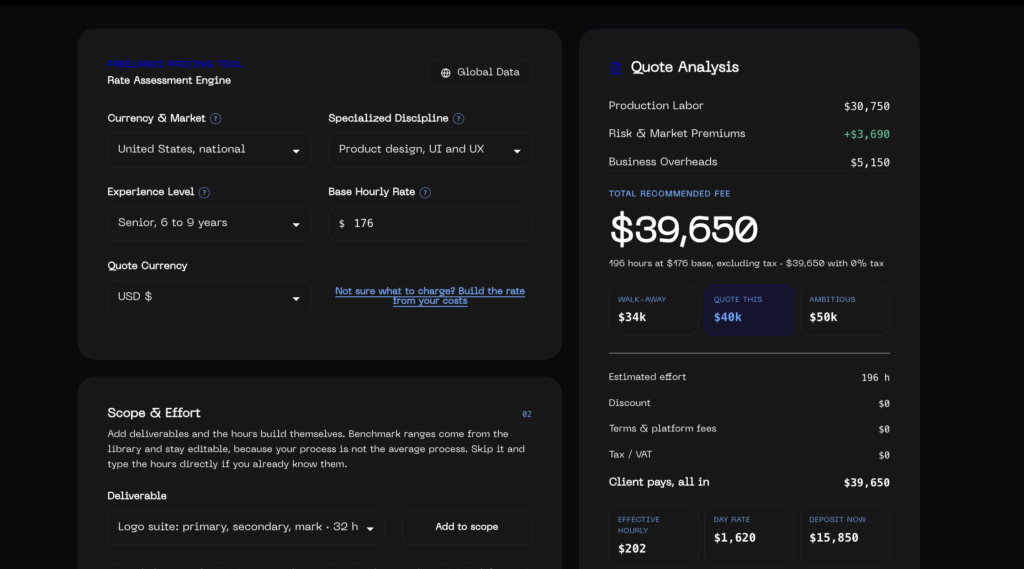
To help freelancers, agencies, and clients navigate this with actual transparency, we created the Freelance Rate Estimator on ipassas.com.
Here is a look under the hood: why we built it, the exact math and data models running behind the scenes, and how you can use it to build quotes you can defend with confidence.
What It Actually Does
The tool tackles two interconnected challenges:
- Builds a Defensible Base Rate: Calculates your real cost-of-living floor, tax obligations, business overhead, and capacity limits, then benchmarks your hourly rate against verified market percentiles.
- Generates Complete Project Quotes: Converts deliverable scope, project management time, brief ambiguity, client scale, urgency, and licensing rights into an itemized, client-ready proposal.
Best of all: it runs 100% in your browser. No accounts, no newsletters to unlock the result, no tracking cookies, and no database calls. Everything you tweak encodes directly into the URL hash, which means you can configure an estimate, hit Share Link, and send an exact, pre-configured proposal directly to a collaborator or client.
The Methodology: How the Numbers Are Calculated
We didn’t want this to be another black box that spits out random high-ticket numbers. Every multiplier and benchmark is grounded in verifiable compensation data and practical agency mechanics.
1. The Bottom-Up Revenue Model
Your hourly rate isn’t an ego score; it is a mathematical requirement to keep your business alive. The bottom-up rate builder solves for your necessary gross revenue:
Next, it calculates your realistic billable capacity:
Dividing the two yields your Absolute Floor (Break-Even Rate):
Adding your reinvestment and profit buffer (typically 15%–20%) establishes your target base hourly rate:
If you fall below this floor, you are effectively subsidizing your client’s business out of your own savings.
2. Market Calibration & Purchasing Power (130 Markets)
To ensure you aren’t pricing yourself out of existence or leaving massive money on the table, the tool tests your bottom-up rate against 2026 direct-client benchmark bands (25th percentile, Median, 75th percentile) calibrated across 130 global economies.
- Anchor Datasets: We pulled salary and freelance rate reports from Robert Half 2026, Levels.fyi, Glassdoor, ERI SalaryExpert, and the AIGA Design Census.
- Purchasing Power Adjustments: Cross-market rates are normalized using OECD, Eurostat, and Numbeo cost-of-living indices.
- The Cross-Border Arbitrage Slider: Working from Lisbon, Athens, or São Paulo for a client in New York or London? You shouldn’t be forced to charge your local rent when delivering top-tier work. The tool lets you blend your rate between your home market and your client’s market (e.g., anchoring 50%–70% toward the client’s home market).
3. Deliverable-Based Scope Building
Instead of pulling a total project number out of thin air, the estimator includes a pre-calibrated library of 40+ deliverables—from UI design systems, SaaS dashboards, and Webflow builds to complete brand identities and pitch decks.
Each item carries an empirical range (low, typical, high hours) based on standard industry workflows, multiplied by an adjustable complexity factor.
4. Why We Add Management & Brief Contingencies
Two silent killers eat freelance profit:
- PM & Stakeholder Overhead: The design work isn’t the only work. Slack messages, status check-ins, revisions, and stakeholder alignment routinely swallow 15% to 25% of any project. The estimator budgets this explicitly.
- Brief Ambiguity: A vague brief is an expensive brief. If a project arrives with loosely defined scopes or requires upfront discovery, the tool factors in a 12% to 35% contingency buffer directly into the labor effort.
5. Multipliers: Value, Urgency, and Usage Rights
A common trap is multiplying independent coefficients together (1.5 × 1.4 × 1.6 × 1.3), which rapidly spirals into absurd quotes.
Our engine uses an additive positioning formula damped to real-world commercial caps (4.5× max on base labor):
- Client Scale: Adjusted for enterprise, scale-ups, seed-funded startups, or small businesses (reflecting governance complexity and balance sheet impact).
- Delivery Urgency: Realistic rush fees ranging from standard timelines to drop-everything sub-72-hour deadlines.
- Intellectual Property & Licensing: You are selling an intellectual asset, not simply renting your hands. The estimator itemizes Territory (local vs. global), Duration (1-year vs. perpetual), Exclusivity, and Media channels based on the Graphic Artists Guild licensing framework.
What You Can Do With It Right Now
Whether you are quoting your very first freelance gig or running an established design studio, here is how to use the tool:
- Audit Your Current Rate: Open the Rate Assessment Engine, select your region and experience level, and check where you land on the ruler against the direct-client median.
- Price Fixed Projects Fast: Pick a one-click template (e.g., Brand Identity Package, SaaS MVP, or Marketing Website), adjust the quantities, and check the suggested payment schedule (Deposit, Midpoint, Final).
- Export and Send: Copy an itemized rate card or project scope directly into your clipboard, print to PDF, or generate a shareable URL to include in your proposal.
- Explore the Global Salary Index: Hit the “Global Data” modal to filter, sort, and download CSV data on designer salaries, median hourly rates, cost indices, and VAT across 130 economies.
Try the Tool
The calculator is live, free to use, and requires zero sign-up:
Launch the Freelance Rate Estimator at ipassas.com
Take it for a spin on your next quote, play with the sliders, and let us know your thoughts. When we take the guesswork out of pricing, everyone in the creative community wins.

Written by Iordanis Passas, creative director, graphic designer and UI designer who designs with AI.